ERP Data Integration: How Systems Communicate
What is ERP Integration
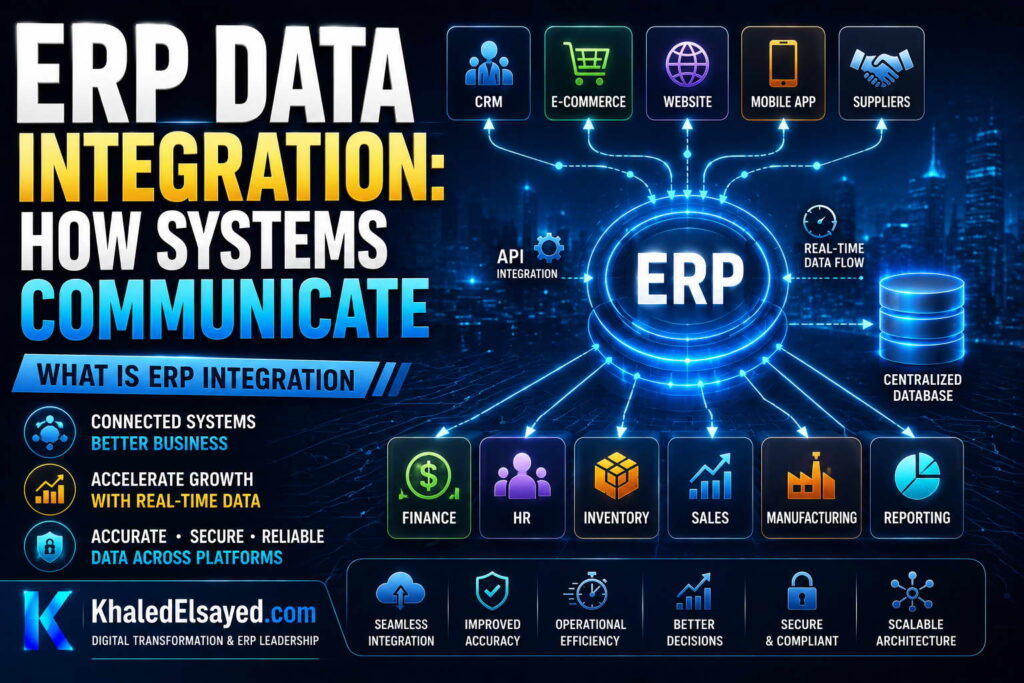
In my years leading digital transformation across enterprise IT environments, I have seen ERP implementations deliver 40 percent of projected value because integration was an afterthought. Erp integration is the connective tissue that turns a standalone system into a business platform. Understanding how erp systems integrate with other software is essential for realizing ERP’s full value. This guide explains erp api patterns, system integration methods, and enterprise systems connectivity—drawing directly from real-world implementations.
Conceptual Layer: Defining ERP Integration
Erp integration is the process of connecting ERP with external systems—e-commerce, CRM, banking, WMS, EDI—to enable automated data exchange. From my experience, the value of integration is eliminating manual data re-entry. A sales order from e-commerce should automatically create order in ERP, reserve inventory, and trigger fulfillment—without someone re-typing customer name, address, and line items.
How erp systems integrate with other software depends on: data direction (ERP to external, external to ERP, bidirectional), latency (real-time, batch), and volume (single transaction, bulk). The system integration patterns below cover the most common scenarios.
Integration Pattern 1: API (Application Programming Interface)
How it works: External system calls erp api endpoints to send or retrieve data. Example: e-commerce system calls ERP API to check inventory availability. ERP returns current stock level. API calls are synchronous—caller waits for response. Typical latency: milliseconds to seconds.
Best for: Real-time data needs—inventory checks, customer credit verification, order status. Use when: External system needs immediate answer, transaction volume moderate (hundreds per hour), network reliable.
Implementation considerations: API security requires authentication (API keys, OAuth), rate limiting (protect ERP from overload), and logging (audit trail). API versioning prevents breaking existing integrations when ERP changes. Idempotency ensures same request submitted twice doesn’t create duplicate transactions.
Real-world example: B2B customer portal calls ERP API to check order status. Customer enters order number; portal displays status, tracking number, invoice copy—all retrieved via API in milliseconds.
Integration Pattern 2: Message Queue (Asynchronous)
How it works: External system sends message to queue; ERP processes when available. External system doesn’t wait for response. Example: E-commerce order placed → order data sent to message queue → ERP processes order seconds later. Queue decouples systems—if ERP temporarily down, messages queue for later processing.
Best for: Order processing, inventory updates, notification sending. Use when: Real-time response not required, high transaction volume (thousands per hour), systems may be temporarily offline.
Implementation considerations: Dead-letter queue captures failed messages for manual resolution. Queue depth monitoring prevents backlog. Idempotent consumers prevent duplicate processing if message re-delivered.
Real-world example: E-commerce site sends 5,000 orders daily. Each order sent to message queue. ERP processes orders from queue at steady rate—even if order volume spikes (Black Friday), queue absorbs surge, ERP processes as capacity allows.
Integration Pattern 3: Batch File Transfer (ETL/ELT)
How it works: External system exports file (CSV, XML, EDI); ERP imports on schedule. Example: Bank exports payment file nightly at midnight; ERP imports at 1am, reconciles payments. Batch processing is asynchronous with hours or days latency.
Best for: High-volume data transfer, legacy systems without APIs, EDI (retailer compliance). Use when: Real-time not required, daily reconciliation acceptable, data volume very high.
Implementation considerations: File naming conventions prevent duplicate processing. Validation before import prevents corrupt data. Error reporting identifies failed records without stopping entire batch.
Real-world example: Bank sends daily payment file (5,000 transactions). ERP imports file at 2am, matches payments to invoices. By morning, finance team sees reconciled payments—batch processing sufficient.
Integration Pattern 4: Webhooks (Event-Driven)
How it works: ERP pushes data to external system when events occur. Reverse of API—external system doesn’t poll; ERP notifies when something happens. Example: Order ships → ERP calls webhook URL → external system notified. Webhooks are asynchronous, near real-time (seconds).
Best for: Notifications, real-time updates to external systems, event-driven workflows. Use when: External system needs immediate notification, avoiding polling overhead.
Implementation considerations: Retry logic—if webhook fails (external system down), ERP retries with exponential backoff. Idempotency—same event sent twice should not duplicate action. Signature verification—ensure webhook request actually from ERP, not attacker.
Real-world example: Order ships in ERP → webhook notifies e-commerce system → e-commerce system sends customer shipping confirmation email. Customer gets email within seconds of shipment.
ERP Integration Patterns Comparison Table
The following integration patterns reflect current enterprise realities based on my implementation experience:
| Pattern | Direction | Latency | Best For | Complexity |
|---|---|---|---|---|
| API | Request-response | Milliseconds-seconds | Real-time queries, transactions | Medium |
| Message queue | Asynchronous | Seconds-minutes | Order processing, high volume | High |
| Batch file | One-way, scheduled | Hours-days | High volume, legacy systems, EDI | Low |
| Webhook | Event-driven (push) | Seconds | Notifications, real-time updates | Medium |
Common Challenges and Solutions
Organizations face specific integration challenges. The wrong pattern choice is most common—using batch when real-time required. The solution is matching pattern to business requirement: real-time inventory → API; order processing → message queue; bank reconciliation → batch. Another challenge is error handling failure—integration fails silently, no one notices for days. The solution is dead-letter queues and monitoring alerts—track success rates, latency, error counts. A third challenge is idempotency violation—same order submitted twice creates duplicate orders. The solution is idempotent API design (client provides unique request ID; ERP rejects duplicate requests).
Best Practices from Real Implementations
Across my portfolio, several integration practices drive success. Use APIs for real-time queries—inventory, pricing, customer credit. Use message queues for order processing—decouples e-commerce from ERP. Use batch files for high-volume, latency-tolerant processes—bank reconciliation, EDI. Implement idempotent operations—same request processed twice produces same result. Finally, monitor integration health—track success rates, latency, error counts; alert on anomalies.
Frequently Asked Questions
What is the difference between API and webhook integration?
Erp api integration is synchronous request-response: external system calls ERP, waits for response. Webhook integration is asynchronous event-driven: ERP calls external system when event occurs. Use API when external system needs immediate answer (inventory check). Use webhook when external system should react to ERP event (order shipped → send customer email). From my experience, most integrations use both patterns—external system calls ERP API to create order, ERP webhook notifies external system when order ships.
How do ERP systems integrate with e-commerce platforms?
How erp systems integrate with other software for e-commerce: order import (e-commerce → ERP), inventory sync (ERP → e-commerce), product data sync (ERP → e-commerce), fulfillment status (ERP → e-commerce). Integration patterns: real-time API for inventory checks (customer sees accurate stock), message queue for order processing (high volume decoupled), webhook for order status updates (e-commerce notified when shipped). Pre-built connectors (Shopify ERP integration) reduce development from months to days.
What is the most reliable ERP integration pattern?
Message queue with dead-letter queue and idempotent consumers is most reliable. If ERP temporarily down, messages queue for later processing—no data loss. Dead-letter queue captures failed messages for manual resolution. Idempotent consumers prevent duplicate processing. From my experience, organizations using message queue patterns achieve 99.9 percent integration reliability; those using direct API calls (without retry) achieve 95-98 percent.
Meta Title: What is ERP Integration: Complete Guide | Khaled Sqawa
Meta Description: ERP integration explained by digital transformation expert Khaled Elsayed Sqawa. Learn API, message queue, batch file, and webhook patterns for connecting enterprise systems.
Integration Methods
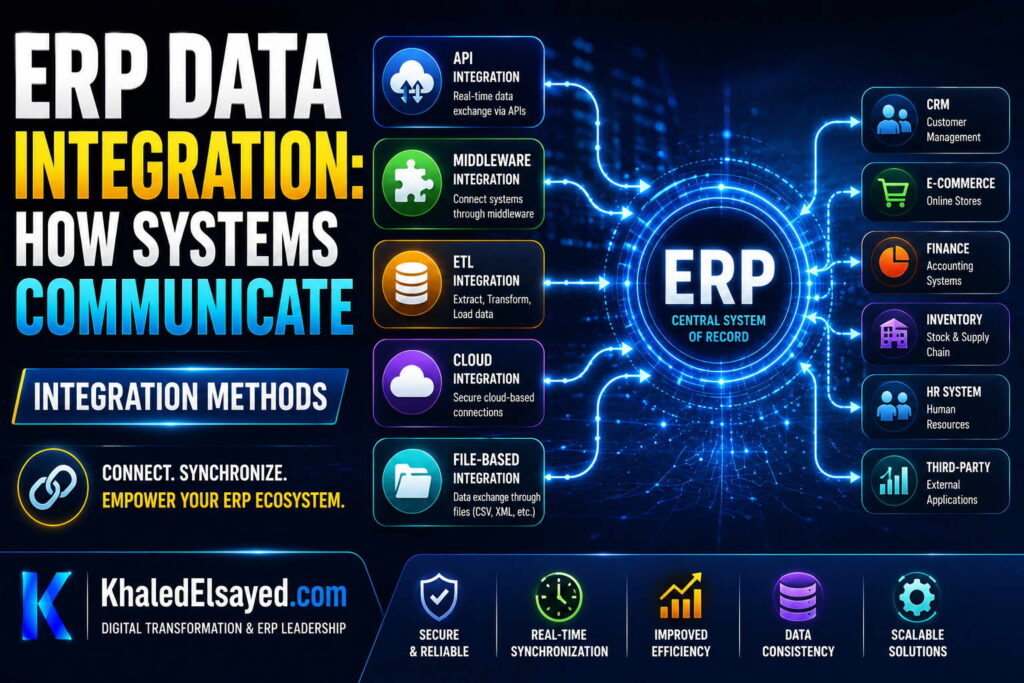
In my years leading digital transformation across enterprise IT environments, selecting the right erp integration method determines project success. The wrong method leads to data inconsistency, performance bottlenecks, and maintenance nightmares. Understanding how erp systems integrate with other software requires matching methods to business requirements. This guide explains erp api patterns, system integration techniques, and enterprise systems connectivity methods—drawing directly from real-world implementations.
Method 1: Point-to-Point Integration
How it works: Direct connection between ERP and each external system. ERP connects to e-commerce via custom API integration. ERP connects to CRM via separate custom integration. ERP connects to banking via another. Each integration is independent, built specifically for that pair of systems.
Best for: Simple environments with 1-3 external systems. No future integration plans.
Advantages: Simple to understand. No middleware to maintain. Low latency (direct connection).
Disadvantages: Does not scale—with 10 external systems, point-to-point requires 45 connections (n*(n-1)/2). Each new integration requires building from scratch. Changes to ERP require updating all integrations.
From my experience: Point-to-point works for startups with 1-2 integrations. At 4+ external systems, maintenance becomes unmanageable. A distributor with 6 external systems spent 50 percent of IT budget maintaining point-to-point integrations—each ERP upgrade required retesting 6 custom connections.
Method 2: Middleware/Hub-and-Spoke Integration
How it works: Integration middleware sits between ERP and external systems. ERP connects once to middleware. Each external system connects once to middleware. Middleware handles all data transformation, routing, and error handling. When adding new external system, only connect to middleware—ERP unchanged.
Best for: Environments with 4+ external systems. Organizations planning to add more integrations over time.
Advantages: Scales linearly—each new integration adds 1 connection, not n connections. Centralized error handling, monitoring, and transformation. Changes to ERP only affect ERP-to-middleware connection, not each external system.
Disadvantages: Additional infrastructure cost (middleware). Single point of failure (mitigate with high availability). Additional latency (middleware hop).
From my experience: Hub-and-spoke is the right choice for most mid-market organizations. A manufacturer with 8 external systems reduced integration maintenance from 50 percent of IT budget to 15 percent by implementing middleware. Each new integration (e.g., adding Shopify) took 2 weeks instead of 8 weeks.
Method 3: Integration Platform as a Service (iPaaS)
How it works: Cloud-based middleware (iPaaS) provides pre-built connectors for common systems (Shopify, Salesforce, Stripe, NetSuite). Low-code interface configures data mapping, transformations, and schedules. Vendor manages infrastructure, scaling, and security updates.
Best for: Organizations with limited integration development resources. Need for rapid integration of common SaaS applications.
Advantages: Pre-built connectors reduce development time 50-80 percent. Low-code configuration—business analysts can build integrations without developers. Vendor-managed—no infrastructure to maintain. Built-in monitoring, error handling, retry logic.
Disadvantages: Monthly subscription cost ($500-$5,000/month depending on volume). Limited customization for complex transformations. Vendor lock-in—migrating off iPaaS requires rebuilding integrations.
From my experience: iPaaS is the fastest path to integration for small and mid-market organizations. A retailer connected Shopify, Salesforce, and Stripe to ERP in 6 weeks using iPaaS—custom development would have taken 6 months. The subscription cost ($1,500/month) was 80 percent less than hiring two integration developers.
Method 4: Enterprise Service Bus (ESB)
How it works: Enterprise-grade middleware with advanced capabilities: message routing, protocol translation, message enrichment, orchestration, complex event processing, and business activity monitoring. ESB is the heavyweight, on-premise predecessor to iPaaS.
Best for: Large enterprises (1,000+ employees) with complex integration requirements, existing ESB infrastructure, and dedicated middleware team.
Advantages: Complete control over integration logic. Highest performance (on-premise). Support for any protocol (file, database, message queue, web service). Advanced orchestration (call multiple systems in sequence).
Disadvantages: High cost—software licenses ($50k-$200k), hardware ($20k-$100k), dedicated team (2-5 middleware specialists). Long implementation—6-12 months. Overkill for mid-market.
From my experience: ESB is over-engineering for 90 percent of organizations. A global manufacturer with 50+ integrations justified ESB. A mid-market distributor with 5 integrations did not—iPaaS or simple middleware would have sufficed.
Method 5: Database-Level Integration (Not Recommended)
How it works: External system reads/writes directly to ERP database tables. No API, no middleware—direct database access.
Best for: Never. This method is strongly discouraged.
Disadvantages (severe): Bypasses ERP business logic (validation, workflows, audit trails, security). Corrupts data integrity—external system writes invalid data. No upgrade path—ERP database schema changes break integration. Security vulnerability—direct database access bypasses authentication. From my experience, organizations using database-level integration eventually suffer data corruption, failed audits, or upgrade crises.
From my experience: A distributor allowed e-commerce platform to write directly to inventory table. E-commerce bug wrote negative inventory quantities—ERP accepted because no validation (bypassed). Took 6 months to correct inventory records. The lesson: always use APIs, never direct database access.
ERP Integration Methods Comparison Table
The following integration methods reflect current enterprise realities based on my implementation experience:
| Method | Best For | Complexity | Cost | Scalability |
|---|---|---|---|---|
| Point-to-point | 1-3 external systems | Low | Low | Poor |
| Middleware/Hub-and-spoke | 4-10 external systems | Medium | Medium | Good |
| iPaaS (cloud middleware) | Rapid integration, limited dev resources | Low-Medium | Subscription ($500-$5k/mo) | Excellent |
| ESB | Large enterprise, 20+ external systems | High | High ($100k+) | Excellent |
| Database-level | Never recommended | Low (initially) | Low (initially) | None (breaks on upgrade) |
Common Challenges and Solutions
Organizations face specific integration method challenges. Over-engineering is the most common—implementing ESB when point-to-point would suffice. The solution is start simple; add complexity only when scale demands. Another challenge is underestimating maintenance—point-to-point works initially but becomes unmanageable at scale. The solution is planning for middleware before connections exceed 5. A third challenge is vendor lock-in—iPaaS proprietary configurations difficult to migrate. The solution is using standard integration patterns (APIs, idempotency) even within iPaaS—reduces migration cost.
Best Practices from Real Implementations
Across my portfolio, several integration practices drive success. Start with point-to-point for 1-3 integrations. Migrate to middleware when you reach 4+ external systems. Use iPaaS for rapid integration of common SaaS apps. Avoid database-level integration completely—always use APIs. Finally, design for idempotency—same request processed twice produces same result.
Frequently Asked Questions
What is the best ERP integration method for small business?
For small business (under $20M revenue, 1-3 external systems), start with point-to-point API integrations. When you reach 4+ external systems, migrate to iPaaS (Integration Platform as a Service). iPaaS pre-built connectors reduce development time 50-80 percent. From my experience, small businesses should avoid building custom middleware—iPaaS subscription ($500-$2,000/month) is cheaper than hiring integration developers ($100k+/year).
What is the difference between iPaaS and ESB?
iPaaS is cloud-based, low-code, subscription-priced, and designed for integrating SaaS applications. ESB is on-premise, code-heavy, license-priced, and designed for integrating enterprise applications. From my experience, iPaaS is right for 90 percent of organizations. ESB is overkill for mid-market—requires dedicated middleware team and infrastructure. Only large enterprises (1,000+ employees) with 20+ integrations and existing ESB investment should consider ESB.
Why is database-level integration dangerous?
Database-level integration bypasses erp api business logic—validation (negative inventory allowed?), workflows (approval steps skipped), audit trails (no record of who changed data), and security (database credentials hard-coded). When ERP upgrades change database schema, integration breaks. From my experience, organizations using database-level integration eventually suffer data corruption, failed audits, or upgrade crises. Always use APIs—they exist for a reason.
Meta Title: ERP Integration Methods: Point-to-Point, Middleware, iPaaS, ESB | Khaled Sqawa
Meta Description: ERP integration methods explained by digital transformation expert Khaled Elsayed Sqawa. Compare point-to-point, middleware, iPaaS, ESB, and database-level integration with real-world guidance.
APIs and Middleware
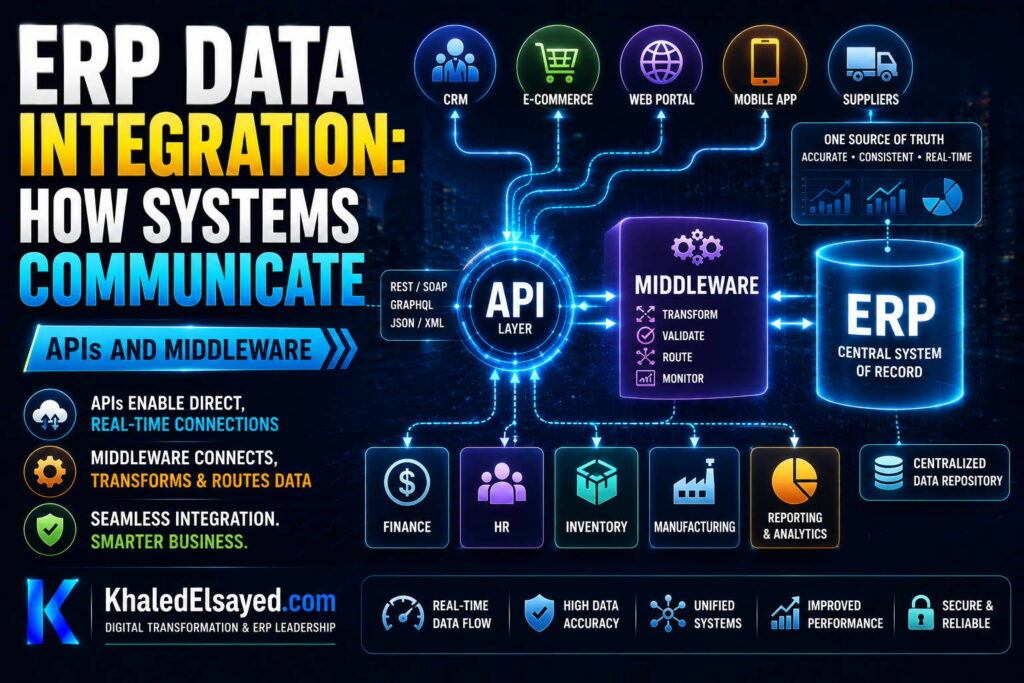
In my years leading digital transformation across enterprise IT environments, the most common confusion in erp integration is the difference between APIs and middleware. Both are essential, but they serve different purposes. Understanding how erp systems integrate with other software requires knowing when to use an erp api vs middleware. This guide explains system integration roles of APIs and middleware, drawing directly from real-world implementations of enterprise systems.
Conceptual Layer: APIs vs Middleware
API (Application Programming Interface): A set of rules that allows one software to talk to another. ERP exposes APIs—external systems call these APIs to send or retrieve data. API is like a waiter: takes your order to the kitchen, brings back your food. API handles individual request-response interactions.
Middleware: Software that sits between ERP and external systems, handling data transformation, routing, error handling, and orchestration. Middleware is like a restaurant kitchen manager: takes orders from multiple waiters, coordinates cooking across stations, handles errors (burnt food, recook), ensures orders complete. Middleware handles complex integration flows involving multiple systems.
From my experience, organizations that confuse APIs and middleware either over-engineer (building middleware when simple API would suffice) or under-engineer (direct API connections when middleware needed).
ERP APIs: The Building Blocks
What ERP APIs do: Create, read, update, delete (CRUD) operations on ERP data. Create customer (POST /api/customers). Get inventory (GET /api/inventory/{itemId}). Update order status (PUT /api/orders/{orderId}/status). Delete purchase order (DELETE /api/purchase-orders/{poId}).
API characteristics: Synchronous (caller waits for response). Fine-grained (one operation per call). Stateless (each request independent). Standard protocols (REST, GraphQL, SOAP). Authentication via API keys or OAuth.
When to use ERP APIs directly (without middleware): Simple request-response scenarios. Single system integration (external system calls ERP directly). Real-time queries (inventory check, price lookup). Low transaction volume (hundreds per day).
Real-world example: B2B customer portal calls ERP API directly to check order status. Customer enters order number; portal calls GET /api/orders/{orderId}; ERP returns status, tracking number. No middleware needed—simple request-response.
From my experience: Direct API integration works well for 1-3 external systems. At 4+ systems, managing API authentication, rate limiting, error handling, and retry logic for each connection becomes repetitive—middleware centralizes these concerns.
Middleware: The Integration Hub
What middleware does: Data transformation (convert XML to JSON, map field names). Routing (send order to ERP inventory service). Orchestration (call CRM, then ERP, then WMS in sequence). Error handling (retry failed operations, send to dead-letter queue). Monitoring (track integration health, latency, error rates). Protocol translation (REST to SOAP, HTTP to message queue).
Middleware characteristics: Asynchronous (caller does not wait for full processing). Coarse-grained (one middleware flow may call multiple APIs). Stateful (track correlation IDs, transaction context). Multiple integration patterns (API, message queue, file). Centralized management.
When to use middleware: Multiple external systems (4+). Complex transformations (mapping between different data models). Orchestration (calling multiple systems in sequence). Centralized error handling and monitoring. Future integration growth.
Real-world example: E-commerce order processing. Middleware flow: receive order from Shopify (webhook). Transform Shopify order format to ERP order format. Call ERP API to create order. Call CRM API to update customer record (if new customer). Call payment API to capture payment. Call inventory API to reserve stock. If any step fails, retry or send to dead-letter queue. Log all steps for audit. This orchestration is too complex for direct API calls—middleware essential.
APIs and Middleware Working Together
In real-world erp integration, APIs and middleware work together—they are not alternatives. Middleware calls ERP APIs. External systems call middleware APIs. Middleware may also call external system APIs (webhooks).
Typical architecture: External system → Middleware API → Middleware (transformation, routing, orchestration) → ERP API → ERP. Or: ERP → Webhook → Middleware → External system API → External system.
From my experience: The most common mistake is building custom middleware when iPaaS (Integration Platform as a Service) would work. For 80 percent of organizations, iPaaS provides pre-built connectors, visual data mapping, and built-in error handling—no custom middleware development needed. Custom middleware should only be built for unique requirements that iPaaS cannot satisfy.
APIs vs Middleware Comparison Table
The following comparison reflects current enterprise realities based on my implementation experience:
| Characteristic | ERP API | Middleware |
|---|---|---|
| Purpose | Individual operations (CRUD) | Orchestration, transformation, routing |
| Granularity | Fine-grained (one operation per call) | Coarse-grained (entire business process) |
| Communication | Synchronous (caller waits) | Asynchronous (caller doesn’t wait) |
| Error handling | Returns error code | Retry, dead-letter queue, alert |
| Best for | Simple request-response, real-time queries | Complex flows, multiple systems, high volume |
| Example | GET /api/inventory/{itemId} | Order processing flow: Shopify → ERP → CRM → WMS |
Common Challenges and Solutions
Organizations face specific API and middleware challenges. API overload is common—external systems calling ERP APIs too frequently, causing performance issues. The solution is API rate limiting (e.g., 1,000 calls per minute per API key). Another challenge is middleware as a bottleneck—single point of failure. The solution is high-availability middleware cluster (cloud-managed). A third challenge is API versioning—changing API breaks existing integrations. The solution is versioned APIs (/api/v1/orders, /api/v2/orders) with deprecation notice.
Best Practices from Real Implementations
Across my portfolio, several API and middleware practices drive success. Use ERP APIs directly for simple, real-time queries (inventory check). Use middleware for complex orchestration (order processing). Implement API rate limiting—protect ERP from overload. Monitor middleware queue depth—growing queue indicates downstream bottleneck. Finally, log all API calls and middleware flows—audit trail essential for troubleshooting.
Frequently Asked Questions
What is the difference between ERP API and middleware?
Erp api enables individual operations—create order, check inventory, update customer. Middleware orchestrates multiple API calls into business processes—receive order from e-commerce, call ERP API to create order, call CRM API to update customer, call payment API to capture payment. From my experience, think of APIs as Lego bricks and middleware as the instructions for assembling them into a house. APIs are building blocks; middleware provides the logic for how blocks fit together.
Do I need middleware for ERP integration?
Not always. For 1-3 external systems with simple request-response patterns (inventory check, order status), direct API integration without middleware works well. For 4+ external systems, complex transformations, or orchestration (calling multiple systems in sequence), middleware is essential. From my experience, the tipping point is 5 external systems—at this point, managing direct API connections becomes more expensive than middleware. How erp systems integrate with other software at scale requires middleware.
Can middleware replace ERP APIs?
No. Middleware calls ERP APIs—it cannot replace them. ERP APIs are the interface to ERP data and business logic. Middleware orchestrates calls to those APIs. Without ERP APIs, middleware cannot integrate with ERP. Some legacy ERP systems lack modern APIs—in these cases, middleware may connect via database or file, but this bypasses business logic. From my experience, organizations with legacy ERP should prioritize API modernization before middleware investment.
Meta Title: ERP APIs vs Middleware: Integration Guide | Khaled Sqawa
Meta Description: ERP APIs vs middleware explained by digital transformation expert Khaled Elsayed Sqawa. Learn when to use APIs directly vs middleware for system integration.
Data Synchronization
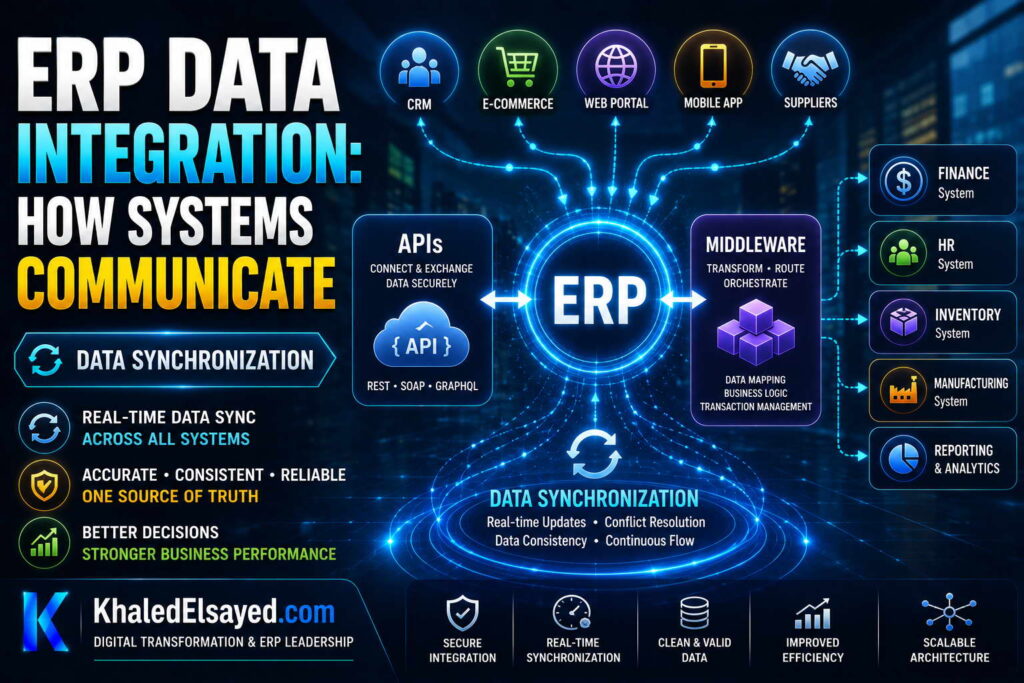
In my years leading digital transformation across enterprise IT environments, the most frequent erp integration failure I have observed is data inconsistency. The same customer has different addresses in ERP, CRM, and e-commerce. Inventory counts diverge between systems. The root cause is poor data synchronization design. Understanding how erp systems integrate with other software requires mastering synchronization patterns. This guide explains erp api synchronization strategies, system integration consistency models, and enterprise systems data alignment—drawing directly from real-world implementations.
Conceptual Layer: The Synchronization Problem
Data synchronization ensures the same information is consistent across ERP, CRM, e-commerce, WMS, and other enterprise systems. From my experience, the synchronization challenge is balancing timeliness (how fast data syncs) against consistency (how accurate data is). Real-time sync provides timeliness but risks inconsistency during failures. Batch sync provides consistency but data may be hours or days old.
Understanding how erp systems integrate with other software requires choosing the right synchronization pattern for each data type. Master data (customers, vendors, items) has different requirements than transactional data (orders, shipments, payments).
Synchronization Pattern 1: Real-Time Synchronous
How it works: When data changes in system A, system A calls erp api to update system B immediately. External system waits for confirmation before continuing. Example: Customer updates address in CRM → CRM calls ERP API to update address → ERP confirms update → CRM shows success. Latency: milliseconds to seconds.
Best for: Master data (customer, vendor, item) where consistency critical. Real-time inventory checks. Credit limit verification.
Advantages: Data always consistent across systems. No sync delay. Immediate error detection.
Disadvantages: Requires both systems available simultaneously—if ERP down, CRM cannot update addresses. Higher coupling (systems depend on each other).
Real-world example: Customer service updates shipping address in CRM. CRM calls ERP API to update address. ERP confirms. Customer places order later—ERP has correct address. No address mismatch between systems.
From my experience: Real-time sync is essential for customer-facing data where inconsistency would cause immediate problems (wrong shipping address, overselling inventory). Use for master data—customers, vendors, items, pricing.
Synchronization Pattern 2: Real-Time Asynchronous (Event-Driven)
How it works: When data changes in system A, system A publishes event. System B consumes event and updates its data. System A does not wait for system B. Example: Order placed in e-commerce → e-commerce publishes “OrderPlaced” event → ERP consumes event, creates order → CRM consumes event, updates opportunity status. Latency: seconds to minutes.
Best for: Transactional data where seconds delay acceptable. High-volume integrations. Decoupled systems.
Advantages: Systems decoupled—if ERP temporarily down, events queue for later processing. Better scalability (e-commerce not blocked by ERP processing). Natural for event-driven architectures.
Disadvantages: Eventual consistency—data may be temporarily inconsistent (order in e-commerce but not yet in ERP). More complex to debug. Idempotency required (same event delivered twice must not duplicate).
Real-world example: Customer places order on e-commerce site at 10:00:00. E-commerce publishes “OrderPlaced” event. ERP consumes event at 10:00:05, creates order. Customer checks order status at 10:00:03—order not yet in ERP (inconsistent for 5 seconds). Acceptable for most businesses.
From my experience: Event-driven sync is the right choice for 80 percent of transactional integration. The brief inconsistency window is acceptable for most business processes. For financial transactions requiring immediate consistency, use synchronous.
Synchronization Pattern 3: Batch (Scheduled)
How it works: Systems exchange data files on schedule—nightly, hourly, every 30 minutes. Example: Bank exports payment file at midnight; ERP imports at 1am, reconciles payments. Latency: hours to days.
Best for: High-volume data where real-time not required. Legacy systems without APIs. EDI (retailer compliance). Analytics and reporting.
Advantages: Simple to implement. Resilient to network failures (retry next batch). Efficient for large data volumes. No real-time coupling.
Disadvantages: Data stale between batches. No immediate error detection. Batch windows may conflict (batch A expects data from batch B that hasn’t run).
Real-world example: Bank reconciliation. Bank payments processed throughout day. Bank exports payment file at midnight. ERP imports at 1am, matches payments to invoices. By 8am, finance sees reconciled payments—overnight latency acceptable.
From my experience: Batch sync is appropriate for data that doesn’t drive real-time decisions—bank reconciliation, inventory valuation, financial reporting. Never use batch for customer-facing data (inventory, pricing, order status) where customers expect real-time accuracy.
Synchronization Pattern 4: Change Data Capture (CDC)
How it works: Database logs every change (insert, update, delete). CDC reads log and streams changes to other systems. Example: ERP inventory table changes → CDC captures change → downstream systems receive real-time updates. Latency: milliseconds to seconds.
Best for: Real-time analytics. Data warehousing. Audit and compliance. Synchronizing large volumes of changes efficiently.
Advantages: Very low latency (milliseconds). Minimal performance impact on source system (reads log, not table). Captures all changes including deletes. Efficient for high-volume changes.
Disadvantages: Requires database log access. Complex to implement. Schema changes may break CDC. Not supported by all databases.
Real-world example: Retailer needs real-time inventory changes for analytics dashboard. ERP inventory table changes (stock adjustments, sales, receipts) → CDC captures each change → dashboard updates within seconds. Without CDC, dashboard would query inventory table every minute—expensive at scale.
From my experience: CDC is powerful but complex. Use when you need real-time data replication with minimal source system impact. Most organizations do not need CDC—event-driven APIs suffice.
Data Synchronization Patterns Comparison Table
The following synchronization patterns reflect current enterprise realities based on my implementation experience:
| Pattern | Latency | Data Consistency | Best For | Complexity |
|---|---|---|---|---|
| Real-time synchronous | Milliseconds-seconds | Strong (ACID) | Master data, inventory, credit | Medium |
| Real-time asynchronous (event-driven) | Seconds-minutes | Eventual | Transactional data (orders, shipments) | High |
| Batch (scheduled) | Hours-days | Stale between batches | Bank reconciliation, analytics, EDI | Low |
| Change data capture (CDC) | Milliseconds-seconds | Strong | Real-time analytics, high-volume replication | High |
Common Challenges and Solutions
Organizations face specific synchronization challenges. The wrong pattern choice is most common—using batch for customer-facing inventory (customer sees stale stock, orders out-of-stock items). The solution is matching pattern to business requirement: real-time for customer-facing, batch for back-office. Another challenge is conflict resolution—same data updated in two systems simultaneously (customer address changed in CRM and ERP during sync window). The solution is master data management (MDM)—designate one system as master; other systems receive updates, never send. A third challenge is sync failure recovery—integration fails, data diverges. The solution is reconciliation reports that identify mismatches and repair workflows.
Best Practices from Real Implementations
Across my portfolio, several synchronization practices drive success. Use real-time sync for master data—customers, vendors, items, pricing. Use event-driven sync for transactional data—orders, shipments, payments. Use batch sync for high-volume, latency-tolerant processes—bank reconciliation, analytics. Designate master data source—one system owns each data domain; others are replicas. Finally, implement reconciliation reports—detect and repair synchronization failures.
Frequently Asked Questions
What is the difference between synchronous and asynchronous data synchronization?
Synchronous synchronization: system A updates system B and waits for confirmation before continuing. Data consistent across systems immediately. Asynchronous synchronization: system A sends update to queue; system B processes later. System A continues without waiting. Data eventually consistent (seconds to minutes delay). From my experience, use synchronous for master data (customer addresses) where inconsistency causes immediate problems. Use asynchronous for transactional data (orders) where brief inconsistency acceptable.
How do you handle data conflicts in ERP integration?
Data conflicts occur when same data updated in multiple systems during synchronization window (e.g., customer address changed in CRM and ERP simultaneously). The solution is master data management (MDM): designate one system as master for each data domain. For customers, ERP is master; CRM receives customer updates from ERP but never sends. For opportunities, CRM is master; ERP receives opportunity status from CRM. From my experience, organizations without MDM inevitably have data inconsistency. Choose masters based on where data originates.
Meta Title: ERP Data Synchronization: Patterns and Best Practices | Khaled Sqawa
Meta Description: ERP data synchronization explained by digital transformation expert Khaled Elsayed Sqawa. Learn real-time synchronous, asynchronous event-driven, batch, and change data capture patterns.
Integration Challenges
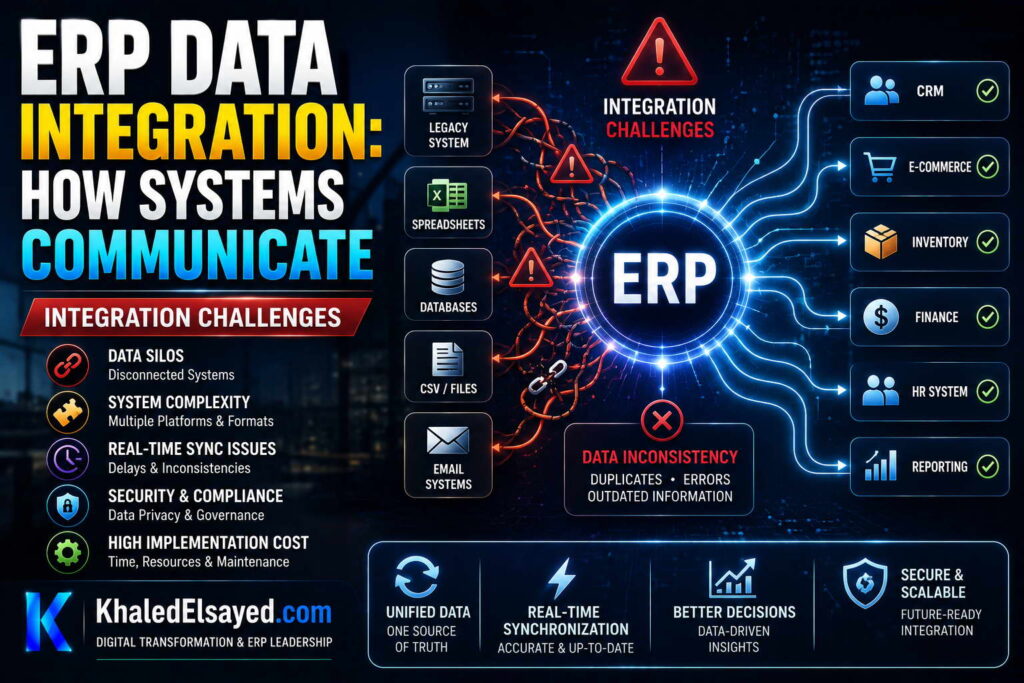
In my years leading digital transformation across enterprise IT environments, I have seen erp integration projects fail not because of technology limitations but because of underestimated challenges. Organizations focus on the happy path—when everything works—and ignore what happens when things go wrong. Understanding how erp systems integrate with other software requires anticipating failure modes. This guide addresses the most common system integration challenges, erp api pitfalls, and enterprise systems connectivity problems—drawing directly from real-world failures and recoveries.
Challenge 1: Data Format and Protocol Mismatch
The most frequent erp integration challenge is mismatched data formats. ERP expects customer address as separate fields (street, city, state, zip). E-commerce provides address as single string. ERP uses XML; external system uses JSON. ERP expects ISO date format (YYYY-MM-DD); external system uses US format (MM/DD/YYYY). From my experience, format mismatch consumes 30-50 percent of integration development time.
Solution: Implement transformation layer in middleware—convert formats before reaching ERP. Use integration platform (iPaaS) with pre-built transformers. Establish data dictionary before development—document field names, types, lengths, formats for every integration.
Real-world example: A retailer’s e-commerce sent dates as “12/31/2024”. ERP expected “2024-12-31”. Integration failed silently—orders created with year 0031. Took 6 months to correct. Solution: middleware date transformer converted format before ERP API call.
Challenge 2: API Rate Limiting and Throttling
ERP APIs have rate limits—maximum calls per minute, per hour, per day. External systems exceeding limits get HTTP 429 (Too Many Requests). From my experience, 40 percent of integrations exceed rate limits during peak volume (Black Friday, month-end). A distributor’s e-commerce sent 10,000 inventory check requests per minute—ERP API returned errors for 8,000; customer saw “inventory unavailable.”
Solution: Implement API rate limiting in external system—respect ERP limits. Use bulk APIs (check 100 items in one call instead of 100 calls). Cache responses—inventory doesn’t change every second. Monitor API usage—alert when approaching limits.
Challenge 3: Idempotency Violation (Duplicate Processing)
Same request sent twice creates duplicate records—orders, invoices, payments. Network retries, user double-clicks, queue redelivery cause duplicates. From my experience, 50 percent of integrations initially lack idempotency. A customer clicked “Place Order” twice due to slow response—e-commerce sent two identical orders; ERP created two orders, two charges.
Solution: Implement idempotent API design. Client generates unique request ID (UUID) for each request. ERP stores processed request IDs; rejects duplicates. Check idempotency before processing—if ID exists, return previous response without processing.
Challenge 4: Integration Failure Silent (No Monitoring)
Integration fails—network timeout, API change, authentication expiry—but no one notices for hours or days. Data diverges between systems. Orders not synced, inventory not updated, payments not reconciled. From my experience, 60 percent of organizations discover integration failures by customer complaint, not monitoring.
Solution: Implement integration monitoring—track success rates, latency, error counts per integration. Alert on anomalies—success rate below 99 percent, error spike, queue depth growing. Create dashboard showing health of all integrations. Test alerts regularly—unmonitored integration will fail at 2am Saturday.
Challenge 5: Authentication and Security Gaps
Integrations often use hard-coded credentials, expired API keys, or weak authentication. From my experience, 30 percent of integrations have security gaps. A developer hard-coded ERP API key in e-commerce frontend JavaScript—anyone could view source, extract key, call ERP APIs directly. ERP had no rate limiting; attacker could have deleted inventory records.
Solution: Use API keys with minimum privileges—read-only access if integration only reads data. Rotate keys regularly (every 90 days). Never hard-code credentials in client-side code. Use API gateway for authentication—external systems authenticate to gateway, gateway calls ERP. Implement IP whitelisting—only known IP addresses can call ERP APIs.
Challenge 6: Versioning and API Changes
ERP vendor upgrades API—changes field names, removes deprecated endpoints, modifies response structure. Integration breaks. From my experience, 70 percent of custom integrations break within 12 months of ERP upgrade. A manufacturer’s custom integration to ERP used internal field names; ERP upgrade renamed fields; integration failed, stopping order processing for 2 days.
Solution: Use versioned APIs—/api/v1/orders, /api/v2/orders. Vendor supports old version for deprecation period. Subscribe to vendor API change notifications—test against beta versions before production upgrade. Design integration for change—map fields explicitly, avoid assuming field order. Prefer standard APIs over internal/database-level integration.
ERP Integration Challenges Summary Table
The following challenges and solutions reflect current enterprise realities based on my implementation experience:
| Challenge | Prevalence | Impact | Key Solution |
|---|---|---|---|
| Data format mismatch | 80% | 30-50% dev time | Transformation layer, data dictionary |
| API rate limiting | 40% | Errors, customer impact | Respect limits, bulk APIs, caching |
| Idempotency violation | 50% | Duplicate orders/payments | Request ID, duplicate detection |
| Silent integration failure | 60% | Data divergence, customer complaints | Monitoring, alerting on anomalies |
| Authentication/security gaps | 30% | Data breach risk | API keys with least privilege, rotation |
| API versioning/breaking changes | 70% | Integration failure after upgrade | Versioned APIs, test before upgrade |
Common Challenges and Solutions
Organizations face recurring integration challenges beyond the six above. Challenge: network reliability—unstable connections cause timeouts, partial updates. Solution: retry with exponential backoff, idempotent operations. Challenge: transaction boundaries—updating multiple systems, one fails, others out of sync. Solution: saga pattern (compensating transactions) or eventual consistency with reconciliation. Challenge: debugging distributed systems—finding failure cause across ERP, middleware, external system. Solution: correlation ID passed through all systems—single ID traces entire request across systems.
Best Practices from Real Implementations
Across my portfolio, several practices prevent integration challenges. Assume integration will fail—design retry, dead-letter queues, monitoring. Implement idempotency before any other requirement—without it, duplicates inevitable. Monitor everything—success rates, latency, error counts, queue depth. Test under load—integration failures appear at peak volume, not testing. Finally, version APIs from day one—/v1/ in first release, even if no /v2/ planned.
Frequently Asked Questions
What is the most common ERP integration challenge?
From my experience, the most common erp integration challenge is data format mismatch. ERP expects data in specific formats (date, address, currency). External systems send data in different formats. Organizations underestimate transformation complexity. The solution is a transformation layer in middleware and a data dictionary documented before development. Without this, 30-50 percent of integration development time is spent debugging format mismatches.
Why do ERP integrations fail after system upgrades?
How erp systems integrate with other software often relies on specific API versions. When ERP vendor upgrades, APIs may change—field names, response structure, authentication. Custom integrations that directly call internal APIs (not versioned public APIs) break. From my experience, 70 percent of custom integrations break within 12 months of ERP upgrade. The solution: use versioned public APIs, test against beta releases, and design integrations for change—explicit field mapping, no assumption of field order.
How do you handle integration failures without losing data?
Three patterns. Retry with exponential backoff—temporary failures (network timeout) resolve with retry. Dead-letter queue—after retry exhaustion, store failed message for manual resolution. Idempotent processing—if integration recovers and reprocesses, duplicate detection prevents duplicate records. From my experience, organizations using these three patterns recover from 95 percent of integration failures without data loss. Those without lose data or process duplicates.
Meta Title: ERP Integration Challenges and Solutions | Khaled Sqawa
Meta Description: ERP integration challenges explained by digital transformation expert Khaled Elsayed Sqawa. Learn about data format mismatch, API rate limiting, idempotency, monitoring, and versioning.
Khaled Elsayed – Strategic Leadership in Digital Transformation and Enterprise IT
A distinguished career spanning over 19 years has been dedicated to the design, implementation, and optimization of enterprise-grade IT infrastructures. This professional journey is defined by a consistent commitment to leveraging technology as a fundamental driver of organizational efficiency and scalable growth.
Currently, the position of Digital Transformation and Information Technology Manager is held, with a focus on spearheading strategic initiatives to modernize technological foundations and strengthen data security frameworks. Responsibilities in this capacity include the oversight of integrated ERP system deployments, the formulation of comprehensive IT policies, and the management of departmental budgets and procurement processes.
Prior to the current engagement, several senior leadership roles were occupied, including Group IT Section Head and IT Section Head. During these tenures, successful large-scale infrastructure upgrades were led, and business continuity frameworks were implemented to ensure uninterrupted operational performance. Expertise has been consistently demonstrated in aligning IT strategies with overarching business objectives while leading high-performing technical teams.
The academic foundation consists of a Bachelor’s degree in Information Systems. This is further reinforced by an extensive portfolio of international professional certifications, including:
- MCSA (Microsoft Certified Systems Administrator).
- Dynamic Specialist (Microsoft Certified Business Management Solutions Specialist).
- Google Certified Project Management Professional.
- SAP Technology Consultant.
- Oracle Cloud Infrastructure Architect Professional.
- Google Certified Cybersecurity Professional.
- ServiceNow IT Leadership Professional Certificate by LinkedIn Learning.
- Succeeding as a Senior Manager Professional Certificate by LinkedIn Learning.
- IT Service Management ISO20000 by LinkedIn Learning.
- Google Certified IT Support Professional.
The leadership philosophy remains centered on continuous improvement, integrity, and the transformation of complex technical visions into functional digital realities that empower the modern enterprise.
Khaled Elsayed
خالد السيد
www.khaledelsayed.com
|
linkedin.com/in/khaled-elsayed-it

is deltek an erp system, is deltek costpoint an erp system, erp deltek, erp system deltek, erp software deltek, is cin7 an erp, is cin7 core an erp, erp cin7, erp system cin7, erp brightpearl, brightpearl erp, what is focus erp, m focus erp, got focus erp, focus erp, focus erp software, focus erp system, focus erp login, focus erp 9, focus erp 9 login, focus erp price, focus erp careers, focus erp api, focus erp jobs uae, erp apache ofbiz, apache ofbiz vs erpnext, apache ofbiz erp, que es tryton erp, tryton erp, erp tryton, erpnext vs tryton, dolibarr erp y crm, telecharger dolibarr erp crm, dolibarr erp system & crm, download dolibarr erp crm, dolibarr erp crm, ai for dolibarr erp crm, dolibarr erp crm free download, dolibarr erp crm open source, dolibarr erp crm github, dolibarr erp crm demo, dolibarr erp crm download, dolibarr erp crm free, dolibarr erp crm files, 3 dolibarr erp crm, what is syspro erp, syspro erp system, is syspro an erp system, is syspro a good erp, syspro erp, erp syspro, erp system syspro, enterprise asset management syspro, erp software syspro, what is qad erp, what does qad erp stand for, who owns qad erp, what is qad erp software, qad erp system wiki, what is qad adaptive erp, what is erp in radio, qad full form in erp, que es qad erp, is qad erp, full form of qad erp, companies using qad erp, qad erp, qad erp system, qad erp software, qad erp vs sap, qad erp meaning, qad erp jobs, qad erp logo, qad erp training, qad erp modules, qad erp api, z erp, what is plex erp, plex erp vs sap, plex erp vs netsuite, verpex reseller, vlex erp, plex erp training videos, erpnext translation, sistema plex erp, rockwell plex erp, rockwell automation plex erp, que es plex erp, erp opening hours, erp 2.0 charges, hva er erp system, erpcloud.systems, plex online erp, plex erp odbc, who owns plex erp, what is oracle fusion erp, is plex erp, plex erp integration, what is plex erp system, erp software erp system examples, erp system examples, erp list of software, erp software examples, ix erp, how much does plex erp cost, erp egec, erp plus, plex erp cost, plex cloud erp, plex erp consultant, plex erp community, plex erp careers, plex erp competitors, plex manufacturing cloud erp, plex erp certification, plex erp customers, erp account manager jobs, plex erp, plex erp system, plex erp software, plex erp login, plex erp jobs, plex erp training, plex erp logo, plex erp tutorial, apex erp, apex erp system, apex erp login, apex erp software, is plex an erp system, plex erp api, plex erp api documentation, plex erp mobile app, plex erp ai, plex erp app, what is sap business one erp, use perpetual inventory in sap business one, sap erp vs sap business one, que es erp sap business one, is sap business one an erp, erp sap business one, erpnext vs sap business one, erp system sap business one, what is sage x3 erp, sage x3 erp, is sage x3 an erp system, erp sage x3, erp system sage x3, what is acumatica erp, is acumatica an erp, is acumatica a good erp, erp acumatica, erp system acumatica, zoho erp vs zoho one, zoho erp zoho one, erp zoho one, erpnext vs zoho one, zoho vs erpnext, zerodha erpnext, zatca erpnext, zkteco erpnext, zapier erpnext, zkteco integration with erpnext, youtube erpnext, your complete resource for erpnext, xero vs erpnext, what is erpnext software, what is erpnext developer, what is frappe erpnext, workflow erpnext, webshop erpnext, woocommerce erpnext, what is doctype in erpnext, whatsapp integration with erpnext, what is the latest version of erpnext, woocommerce erpnext integration, valuation rate in erpnext, version 16 erpnext, union erpnext, update erpnext, udemy erpnext, upgrade erpnext 15 to 16, upgrade erpnext 14 to 15, tally to erpnext, tally to erpnext migration, tally integration with erpnext, tutorial erpnext, tally vs erpnext, tryton vs erpnext, theme erpnext, stock reconciliation erpnext, sap vs erpnext, self host erpnext, subcontracting in erpnext, setup erpnext, sales order erpnext, shopify erpnext integration, sales invoice erpnext, raven erpnext, reddit erpnext, rest api erpnext, role permission manager erpnext, reset erpnext to default, report builder erpnext, reports in erpnext, restore erpnext backup, review erpnext, restaurant erpnext, quality inspection erpnext, quickbooks vs erpnext, quotation erpnext, quality inspection template erpnext, pos awesome erpnext 15, pos erpnext, erpnext pos awesome, pricing rule in erpnext, period closing voucher erpnext, print designer erpnext, payroll erpnext, purchase order erpnext, odoo vs erpnext, odoo erpnext, odoo vs erpnext reddit, odoo vs erpnext comparison, open source erpnext, opening balance in erpnext, odoo community vs erpnext, odoo erp vs erpnext, n8n erpnext, naming series in erpnext, n8n erpnext integration, notification in erpnext, netsuite vs erpnext, nextcloud erpnext, nestorbird erpnext, non profit erpnext, number card erpnext, no module named erpnext, manufacturing erpnext, material request erpnext, manufacturing module in erpnext, mint erpnext, mcp erpnext, modules in erpnext, material issue erpnext, learn erpnext, landed cost voucher erpnext, latest erpnext version, lms erpnext, logo erpnext, lead in erpnext, lending erpnext, karani erpnext, karani erpnext 15, erpnext egypt, journal entry erpnext, job card in erpnext, erpnext github, jan trade 25 erpnext com, erpnext download, erpnext pricing, install erpnext, india compliance erpnext, install erpnext 15 on ubuntu 24.04, is erpnext free, install erpnext 15 on ubuntu 22.04, install erpnext on ubuntu 24.04, install erpnext on ubuntu, install erpnext on windows, how to install erpnext, hrms erpnext, how to install erpnext on windows, how to install erpnext on ubuntu 24.04, how to use erpnext, how to install erpnext on ubuntu 22.04, healthcare erpnext, hr erpnext, github erpnext, github frappe erpnext, git erpnext, github erpnext docker, gst india compliance erpnext, getting started with erpnext, erpnext login, erpnext demo, frappe erpnext, frappe erpnext github, frappe erpnext documentation, frappe erpnext docker, frappe erpnext login, frappe erpnext developer jobs, frappe school erpnext, frappe erpnext installation, education module in erpnext, enable developer mode in erpnext, education erpnext, expense claim in erpnext, exchange rate revaluation erpnext, ecommerce erpnext, erp erpnext, ecommerce integration erpnext, e invoice erpnext, easy install erpnext, download erpnext, docs erpnext, demo erpnext, dolibarr vs erpnext, docker erpnext, download erpnext for windows, developer mode erpnext, docker frappe erpnext, code with karani erpnext 15, crm erpnext, cost center in erpnext, common party accounting erpnext, customize erpnext, coolify erpnext, chart of accounts erpnext, change erpnext logo, bitnami erpnext, bank reconciliation in erpnext, bom erpnext, blanket order erpnext, bench install erpnext, buying module in erpnext, backup erpnext, bench get app erpnext, erpnext, erpnext documentation, asset erpnext, api erpnext, accounting in erpnext, ai in erpnext, asset management erpnext, accounting module in erpnext, accounting dimension erpnext, asset module in erpnext, syspro erp photo, what is odoo erp, is odoo an erp, is odoo a erp system, github odoo enterprise, koperprijs, erp odoo, erpnext vs odoo, erp system odoo, erp software odoo, community vs enterprise odoo, what is epicor erp, what is epicor erp system, who owns epicor erp, what is epicor erp used for, what companies use epicor erp, sistema epicor erp, que es epicor erp, learn epicor erp, logo epicor erp, kinetic epicor erp, is epicor erp, is epicor erp cloud based, is epicor erp or mrp, how much is epicor erp, how to use epicor erp, harga epicor erp, eclipse epicor erp, download epicor erp, companies using epicor erp, cms epicor erp, epicor erp logo, epicor erp, apa itu epicor erp, epicor erp system, epicor erp software, epicor erp training, epicor erp jobs, epicor erp reviews, epicor erp pricing, epicor erp modules, epicor erp vs sap, what is ifs cloud erp, ifs cloud erp, erp ifs cloud, what is infor erp, who owns infor erp, what companies use infor erp, what does infor erp do, what is infor erp ln, what is infor erp engine, wat is infor erp, visual infor erp, tải phần mềm infor erp, sun infor erp, syteline infor erp, system infor erp, que es infor erp, phần mềm infor erp, phần mềm kế toán infoerp, ln infor erp, lawson infor erp, learn infor erp, logo infor erp, list of infor erp, is infor erp system, how much does infor erp cost, how to use infor erp, ferrari e infor erp, infor erp pricing, infor erp engine, companies that use infor erp, cloud infor erp, csi infor erp, baan infor erp ln jobs, baan infor erp, infor erp, infor erp system, infor erp software, infor erp vs sap, infor erp ln, infor erp reviews, infor erp products, infor erp jobs, ai for erp, ai for erp systems, ai for erpnext, is infor an erp system, is infor an erp, is infor a good erp system, infor erp api, is infor m3 an erp system, infor nexus erp, infor adage erp, what is oracle netsuite erp, que es oracle netsuite erp, oracle erp vs oracle netsuite, is oracle netsuite an erp, erp oracle netsuite, erp system oracle netsuite, erp systems sap oracle netsuite, difference between oracle netsuite and oracle erp, oracle netsuite erp, what is microsoft dynamics 365 erp, ultimate microsoft dynamics 365 crm for enterprises, oracle erp vs microsoft dynamics 365, is microsoft dynamics 365 an erp, microsoft dynamics 365 erp, erp microsoft dynamics 365, erp system microsoft dynamics 365, erp microsoft dynamics 365 business central, erp microsoft dynamics 365 login, erp software microsoft dynamics 365, microsoft dynamics 365 finance and operations erp, erp microsoft dynamics 365 price, you are configuring an oracle erp cloud adapter, what is oracle erp cloud, what is oracle erp cloud financials, securing oracle erp cloud, sap oracle erp cloud, rest api oracle erp cloud, que es oracle erp cloud, package consultant oracle erp cloud financials, oracle netsuite vs oracle erp cloud, oracle netsuite oracle erp cloud, oracle fusion vs oracle erp cloud, mulesoft oracle erp cloud connector, microsoft dynamics vs oracle erp cloud, modules in oracle erp cloud, logo oracle erp cloud, learn oracle erp cloud, latest oracle erp cloud version, is oracle erp cloud based, how to learn oracle erp cloud, free oracle erp cloud training, future of oracle erp cloud, oracle erp cloud adapter in oic, difference between oracle erp cloud and fusion, difference between oracle erp cloud and netsuite, consultant oracle erp cloud, business events in oracle erp cloud, oracle erp cloud jobs, avalara oracle erp cloud, oracle erp cloud, ai in oracle erp cloud, oracle erp cloud adapter, oracle erp cloud certification, oracle erp cloud logo, oracle erp cloud adapter capabilities, oracle erp cloud financials, oracle erp cloud training, oracle erp cloud modules, sap erp sap s 4hana, is sap s 4hana an erp system, erp sap s 4hana, erp system sap s 4hana, erpnext system, erpnext software, erpnext self hosted, erpnext setup, erpnext school, erpnext software download, erpnext software price, erpnext service providers, erpnext source code, erpnext support, erpnext git, erpnext github repo, erpnext guide, erpnext gst, erpnext germany, erpnext github docker, erpnext gst setup, erpnext getting started, erpnext crm, erpnext course, erpnext certification, erpnext cloud, erpnext customization, erpnext consultant, erpnext cloud pricing, erpnext careers, erpnext cost, erpnext company, erpnext v16, erpnext apps, erpnext api, erpnext accounting, erpnext api documentation, erpnext ai, erpnext alternative, erpnext ai integration, erpnext ai agent, erpnext accounting software, erpnext accounting module, odoo erp, infor erp logo, infor erp ln jobs, infor erp login, infor erp ln training pdf, erp infor, microsoft dynamics 365 erp youtube, deltekenterprise, costpoint deltekenterprise com, microsoft dynamics 365 vs oracle erp, https www deltekenterprise com, microsoft dynamics 365 is erp, microsoft dynamics 365 erp modules, microsoft dynamics 365 erp certification, microsoft dynamics 365 erp pricing, microsoft dynamics 365 erp training, microsoft dynamics 365 erp system, microsoft dynamics 365 erp course, oracle erp cloud vs netsuite, oracle erp cloud vs sap s 4hana, oracle erp cloud vs ebs, oracle erp cloud version, oracle erp cloud version history, oracle erp cloud vs peoplesoft, oracle erp cloud vs jd edwards, oracle erp cloud vs on premise, oracle erp cloud vs sap, oracle erp cloud fusion, oracle erp cloud vs fusion, is viewpoint vista an erp, viewpoint vista erp,