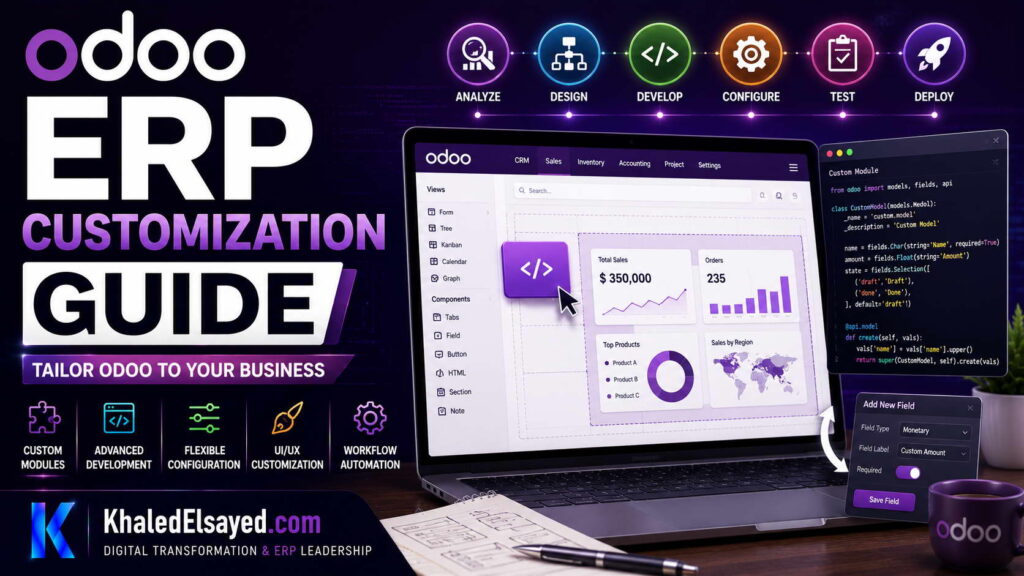
Odoo ERP Customization Guide
In my years leading digital transformation across enterprise IT environments, I have seen organizations approach ERP customization with either excessive caution or reckless abandon. The question of how to customize odoo erp system is one I encounter frequently from executives who have selected Odoo for its flexibility. In this comprehensive odoo development guide, I will share my methodology for balancing customization needs with upgradeability, covering odoo modules development, erp customization best practices, and strategies to customize odoo erp effectively without creating technical debt.
What is Odoo ERP Customization?
Odoo development refers to the process of modifying or extending the Odoo ERP system to meet specific business requirements. Odoo modules are the building blocks of customization—they can be created, modified, or extended to add functionality not available in standard odoo modules. From my experience, the most successful odoo development projects follow a disciplined approach that distinguishes between configuration and customization, using each appropriately.
Understanding how to customize odoo erp system is essential for organizations with unique processes that cannot be met through standard configuration alone. However, I consistently emphasize that customization should be the exception, not the rule—configuration should always be the first approach.
Configuration vs Customization: Understanding the Difference
One of the most common challenges I encounter is confusion between configuration and customization. This distinction is critical in odoo development because it affects upgradeability, maintenance costs, and total cost of ownership.
Configuration: Using Odoo’s built-in tools to adapt the system without modifying code. Examples include: setting up approval workflows, creating custom reports using Odoo’s reporting engine, configuring user roles and permissions, and setting up email templates and notifications.
Customization: Modifying or extending Odoo’s source code to add functionality not available through configuration. Examples include: creating new modules, modifying existing module behavior, developing custom integrations, and building custom interfaces.
From a strategic IT leadership perspective, the principle I emphasize is: configure first, customize only when necessary. Configuration is upgrade-safe and lower cost. Customization creates upgrade debt that must be managed.
The Odoo Development Framework
Throughout my odoo development experience, I have refined a framework for managing customizations that balances business needs with technical sustainability. Based on my observations across numerous implementations, the following framework consistently delivers results.
1. Requirements Analysis and Justification
Before beginning any odoo development, I require a clear business justification. The key questions I recommend asking: Can this requirement be met through configuration? Does the requirement provide genuine competitive advantage? What is the estimated development and maintenance cost? What is the upgrade risk?
In my experience, approximately 70% of requested customizations can be eliminated through process redesign or configuration. Organizations that apply this discipline achieve significantly lower TCO.
2. Architecture and Design
When odoo development is justified, I recommend following Odoo’s development best practices. The key activities include: creating a new module rather than modifying existing ones, following Odoo’s naming conventions and module structure, designing for upgrade compatibility, and documenting design decisions.
3. Development and Testing
During the odoo development phase, I emphasize quality and maintainability. The key practices include: using version control (Git), implementing unit tests, conducting code reviews, and performing integration testing with existing modules.
4. Documentation and Knowledge Transfer
Documentation is essential for maintaining odoo modules over time. I recommend documenting: the business requirement and justification, technical design and architecture, configuration steps, and testing procedures.
Types of Odoo Customizations
Based on my odoo development experience, customizations fall into several categories, each with different approaches and implications.
Module Development: Creating new modules to add functionality not available in standard Odoo. Examples: industry-specific functionality, unique business processes, and custom reporting and analytics.
Module Extension: Extending existing modules to add or modify functionality. Examples: adding fields to standard models, modifying existing views, and overriding standard methods.
Integration Development: Connecting Odoo to external systems. Examples: e-commerce platform integration (Shopify, Magento), payment gateway integration, and legacy system integration.
UI/UX Customization: Modifying the user interface. Examples: custom dashboards, tailored views for specific user roles, and custom themes.
Best Practices for Odoo Customization
Across my portfolio of odoo development projects, several practices consistently distinguish successful customizations from those that create ongoing challenges.
Use the Odoo Studio for Simple Customizations: Odoo Studio provides a no-code interface for many common customizations. I recommend using Studio for field additions, view modifications, and simple automations before resorting to code.
Create New Modules, Don’t Modify Existing Ones: I enforce a strict rule: never modify Odoo’s core modules. Instead, create new modules that inherit from or extend existing functionality.
Follow Odoo’s Development Standards: Odoo provides comprehensive development guidelines. Adhering to these standards ensures upgrade compatibility and easier maintenance. Key standards include: using the correct module structure, following naming conventions, and implementing proper security controls.
Implement Automated Testing: Automated tests are essential for maintaining customization quality over time. I recommend implementing unit tests for all custom modules and integration tests for critical workflows.
Document Everything: Documentation is often neglected in odoo development projects. I recommend documenting the business justification, technical design, and configuration steps for every customization.
Common Challenges and Solutions in Odoo Customization
Throughout my odoo development experience, I have encountered recurring challenges. Understanding these challenges in advance helps avoid them.
Challenge: Upgrade Compatibility. Customizations can break during Odoo upgrades. The solution is following best practices (new modules, no core modifications), implementing comprehensive testing, and maintaining a testing environment.
Challenge: Performance Impact. Poorly written custom code can impact system performance. The solution is following performance best practices, conducting load testing, and monitoring performance metrics.
Challenge: Maintenance Burden. Customizations require ongoing maintenance. The solution is minimizing customizations, documenting thoroughly, and establishing a maintenance process.
Customization vs. Configuration Decision Matrix
The following decision matrix helps determine whether configuration or customization is appropriate:
| Factor | Configuration | Customization |
|---|---|---|
| Upgrade impact | None | Requires testing |
| Cost | Low | High |
| Maintenance | Minimal | Ongoing |
| Risk | Low | Moderate to High |
| Time to implement | Days to weeks | Weeks to months |
Security Considerations in Odoo Customization
In enterprise environments I have worked with, security is a primary concern when considering odoo development. I recommend implementing role-based access control for all custom modules, applying security groups and record rules, validating all user inputs, and implementing proper authentication and authorization.
My Professional Perspective on Odoo Customization
When advising executives on how to customize odoo erp system, I emphasize that the most successful odoo development projects are those that minimize customization. The open-source model provides flexibility, but that flexibility comes with responsibility. Every line of custom code creates upgrade debt.
The most common mistake I encounter is organizations customizing before exploring configuration options. In my experience, 70% of requested customizations can be eliminated through process redesign or configuration. My strategic recommendation is to adopt a “configuration-first” approach. Exhaust configuration options before considering code modifications.
Frequently Asked Questions
How do I customize Odoo without breaking upgrades?
Create new modules rather than modifying existing ones. Use inheritance to extend functionality. Follow Odoo’s development standards. Implement automated testing. This approach minimizes upgrade impact.
What is the difference between Odoo Studio and code customization?
Odoo Studio is a no-code tool for simple customizations—field additions, view modifications, basic automations. Code customization is required for complex functionality, custom business logic, and integrations. I recommend using Studio first, code only when necessary.
How much does Odoo customization cost?
Customization costs vary widely based on complexity. Simple customizations: $1,000-$5,000. Moderate customizations: $5,000-$20,000. Complex customizations: $20,000-$100,000+.
Can Odoo be customized for any industry?
Yes, Odoo’s modular architecture and open-source nature make it highly customizable across industries. I have implemented Odoo for manufacturing, distribution, retail, professional services, and healthcare.
Conclusion
Understanding how to customize odoo erp system is essential for organizations that need to adapt the platform to unique requirements. The modular architecture and open-source foundation make Odoo highly customizable, but disciplined implementation is required to avoid upgrade challenges.
From my years of leading odoo development projects, I have found that the organizations that succeed are those that follow a “configuration-first” approach, minimize customizations, and maintain rigorous documentation and testing standards. My professional recommendation is to treat customization as a strategic decision, not a default approach. When customization is justified, follow best practices to ensure long-term maintainability and upgradeability.
Meta Title: Odoo ERP Customization Guide: Best Practices 2026 | Khaled Sqawa
Meta Description: Odoo ERP customization guide by digital transformation expert Khaled Elsayed Sqawa. Learn how to customize Odoo ERP system with best practices and real-world insights.
Suggested Tags: Odoo Customization, Odoo Development, ERP Customization, Odoo Modules
Khaled Elsayed Sqawa
I am Khaled Elsayed Sqawa, a Senior IT Manager, Digital Transformation Leader, and ERP Consultant with more than 19 years of experience in Information Technology, Digital Transformation, Enterprise Infrastructure, Cybersecurity, Cloud Computing, and ERP Systems.
Throughout my career, I have led large-scale technology initiatives across the FMCG, Manufacturing, Education, and Non-Profit sectors, helping organizations modernize their operations, optimize business processes, strengthen cybersecurity, and leverage technology as a strategic driver of growth and operational excellence.
My expertise covers Digital Transformation Strategy, ERP Implementation and Optimization, Enterprise Infrastructure Management, Cloud Architecture, Cybersecurity, IT Governance, Business Continuity, IT Service Management, Data Centers, Vendor Management, Budget Planning, Process Automation, and Technology Leadership. I have successfully implemented and managed Odoo ERP, Microsoft Dynamics, Microsoft Great Plains, Microsoft 365, Google Workspace, Oracle Cloud Infrastructure, Sophos Firewall, FortiGate Security Solutions, and enterprise network environments.
Currently, I serve as Digital Transformation and Information Technology Manager, where I lead ERP modernization, workflow automation, cybersecurity enhancement, infrastructure development, e-learning platforms, and organization-wide digital transformation initiatives. Throughout my professional journey, I have also held leadership positions including Group IT Section Head and IT Section Head, managing enterprise environments, multi-site operations, nationwide IT support services, infrastructure modernization programs, and business-critical technology projects.
I hold a Bachelor’s Degree in Information Systems and a broad portfolio of internationally recognized professional certifications, including:
• Oracle Cloud Infrastructure Architect Professional
• SAP Technology Consultant
• Google Project Management Professional Certificate
• Google Cybersecurity Professional Certificate
• Microsoft Certified Systems Administrator (MCSA)
• Microsoft Certified Business Management Solutions Specialist (Dynamics Specialist)
• ServiceNow IT Leadership Professional Certificate
• Succeeding as a Senior Manager Professional Certificate
• IT Service Management ISO 20000 Professional Certificate
• Google IT Support Professional Certificate
• ITIL 4 Foundation (Self Study)
I believe that technology should not merely support business operations—it should transform them. My mission is to bridge the gap between business objectives and technology capabilities, enabling organizations to achieve sustainable growth, operational excellence, digital resilience, and long-term success.
Khaled Elsayed Sqawa
خالد السيد سقاوة
Senior IT Manager | Digital Transformation Leader | ERP Consultant | Cloud & Infrastructure Architect
Website: https://www.khaledelsayed.com
LinkedIn: https://www.linkedin.com/in/khaled-elsayed-it